Prepaid eSIM Plans That Actually Save You Money and Hassle
Prepaid eSIM is the simplest way to connect to a mobile network without a physical SIM card. You buy a digital data plan online, scan a quick QR code, and activate it instantly on your phone. It lets you skip roaming fees, stay connected abroad, and keep your regular SIM free for calls. Just load it with credit, use what you need, and top up again whenever you want.
Understanding the Shift to Digital SIM Cards
The shift to a prepaid eSIM feels less like swapping a plastic card and more like unlocking a door from anywhere. You no longer hunt for a physical store upon landing; instead, you scan a QR code in the airport lounge or even before your flight departs. This digital SIM lives in the phone’s firmware, meaning you can download a prepaid plan from a provider in another country without waiting for mail—or paying roaming fees from your home carrier. One unexpected nuance is managing multiple profiles, like keeping your home number active for 2FA while toggling your travel eSIM on for data. The real context is liberation: it’s about having instant, prepaid connectivity that adapts to your location, not the other way around.
What a Prepaid eSIM Actually Is and How It Differs from Physical Cards
A prepaid eSIM is a fully digital SIM profile you download directly onto your compatible phone, bypassing the need for a plastic card. Unlike a physical SIM, you don’t wait for delivery or fumble with a tiny tray; you purchase a plan online and install it via a QR code or app within seconds. This embedded chip allows you to store multiple profiles simultaneously, letting you switch between carriers without swapping cards. Its core advantage is complete flexibility—you can activate a local data plan before landing abroad, instantly connect, and seamlessly manage prepaid eSIM profiles from your device settings without ever handling plastic.
The Growing Demand for Flexible, No-Contract Mobile Plans
The growing demand for flexible, no-contract mobile plans is driven by users who reject long-term commitments in favor of on-demand connectivity. Prepaid eSIMs enable this shift by allowing travelers, remote workers, and minimalists to activate a local data plan instantly without visiting a store or signing a contract. This model eliminates overage fees and gives users full control over their spending, as they can top up, pause, or switch plans each billing cycle. The need for instant prepaid eSIM activation is now central to how people manage mobile costs and coverage, especially for temporary stays or multi-destination trips. Users no longer tolerate being locked into a network; they demand the freedom to change providers digitally as their schedule or location changes.
- Eliminates credit checks and monthly bills, replacing them with one-time or short-term payments
- Lets users switch between carriers or countries without canceling a contract or paying penalties
- Provides immediate activation via QR code, bypassing physical SIM delivery delays
- Allows data-only or voice-only packages, avoiding unused bundled services
Key Advantages of Using a Digital SIM Without a Contract
The biggest win with a prepaid eSIM is complete freedom—no contract means you’re never locked into a monthly bill or stuck paying early termination fees. You simply buy data when you need it, with plans ranging from a day to a month. This is perfect for travelers or anyone who hates surprise charges, as your cost is fixed upfront.
You can pause or ditch your plan instantly without penalty, giving you total control over your budget and connectivity.
Another major plus is the ease of switching: if you find a cheaper or faster network, you just download a new eSIM profile—no waiting for a physical card or dealing with a carrier to cancel.
Instant Activation and Remote Provisioning for Travelers
For travelers, instant eSIM activation transforms arrival logistics. You purchase a prepaid plan from your departure lounge and, upon landing, simply scan a QR code or tap an app notification. Within seconds, you’re connected to a local network, bypassing airport SIM kiosks and roaming menus. This remote provisioning eliminates hunting for physical cards or juggling paper instructions mid-transit. Need more data mid-trip? You can top up and instantly activate a new package without visiting a store. Your device remains usable and online the moment you step off the plane, turning a multi-step chore into a seamless, one-tap experience.
Cost Savings and Budget Control with Zero Hidden Fees
Prepaid eSIMs deliver true budget control by eliminating surprise charges. You pay upfront for a specific data package, and the cost is final—no overage fees, no roaming surcharges, and no monthly bills. This fixed-price model lets you allocate exactly what you need, preventing budget creep. Because there is no contract, you avoid activation fees or early termination penalties. Every cent you spend goes to your chosen data; nothing is siphoned off by hidden administrative costs. This transparency transforms mobile spending from a variable liability into a predictable, manageable expense.
Prepaid eSIMs lock in your costs with zero hidden fees, turning mobile spending into a predictable, fixed expense you fully control.
Dual SIM Capabilities: Keeping Your Primary Number Active
A prepaid eSIM’s dual SIM capability lets you keep your primary number active without juggling physical cards. You assign your main line to the physical SIM for calls and texts, while the eSIM handles a separate data plan for travel or backup. This prevents service interruptions, as your primary number remains reachable even when the eSIM’s prepaid data runs low. You control which line uses cellular data, ensuring essential apps never fail. Switching between profiles takes seconds in settings, removing the need to notify contacts of a temporary number. It offers practical flexibility: your home number stays online, while you benefit from a contract-free, prepaid eSIM’s data allowance.
Top Factors to Evaluate Before Purchasing a Virtual Prepaid Plan
The tall traveler, clutching his phone in a bustling Mumbai market, realized he should have checked data coverage maps before buying that prepaid eSIM. Now, his video call kept buffering. He’d also missed the activation window—his plan required installation before he left home. Top factors to evaluate before purchasing a virtual prepaid plan include coverage reliability, data speed tiers, activation timelines, and device compatibility. “What happens if I land and the eSIM doesn’t work?” he wondered. A smarter buyer would have verified if the plan allows hotspot sharing for a laptop and whether unused data rolls over. He learned the hard way that reading the fine print on validity—especially for short trips—saves more than just money.
Device Compatibility: Checking Your Smartphone’s eSIM Support
Before buying a virtual prepaid plan, confirming your smartphone’s eSIM support is non-negotiable. Start by checking your device’s settings for an “Add eSIM” or “Cellular Plan” option, or verify its IMEI with your carrier’s compatibility tool. Recent flagship models from Apple, Samsung, and Google overwhelmingly support eSIM, but older or region-specific phones may not. Always confirm eSIM support before purchase to avoid a nonfunctional plan. Even if your phone lists eSIM, double-check that it is not carrier-locked to a different network, as this blocks a new prepaid eSIM profile.
| Action | Key Detail |
|---|---|
| Check Settings | Navigate to Settings > Cellular/Mobile Data > Add eSIM |
| Verify IMEI | Dial *#06# for IMEI, then use carrier’s online checker |
| Carrier Lock | Ensure phone is unlocked from prior carrier |
Data Speeds, Network Coverage, and Roaming Partnerships
When evaluating a prepaid eSIM, scrutinize advertised data speeds and roaming partnerships rather than just headline download figures. Actual throughput depends on the local carrier’s 4G/5G congestion and whether the eSIM prioritizes postpaid users—many budget eSIMs throttle video streaming or cap peak Mbps. For network coverage, verify the eSIM’s underlying native operators in your destinations; a single-partner plan often fails in rural zones where a multi-IMSI provider switches between carriers for optimal signal. Roaming partnerships dictate whether you roam on a premium Tier-1 network or a budget MVNO that suffers deprioritization during peak hours.
| Aspect | Best Practice | Red Flag |
|---|---|---|
| Data Speed | Check for “no throttling” & full-speed 5G SA access | “Fair usage” caps below 1 Mbps after small data bucket |
| Coverage | Multi-carrier eSIM (e.g., via roaming hub) for fallback towers | Single carrier in country with poor rural density |
| Roaming Partners | Confirmed native roaming pacts with local incumbents | Deprioritized MVNO roaming on congested visitor networks |
Plan Duration and Flexible Top-Up Options
When selecting a prepaid eSIM, plan duration directly impacts how you manage travel or data needs. Short-term plans (7, 15, or 30 days) suit single trips, while longer 90-day or annual options offer better value for frequent travelers. Flexible top-up options allow you to extend validity or add data without purchasing a new plan, preventing service interruption. Some providers let you stack top-ups to roll over unused data, avoiding waste. Always verify whether a top-up refreshes the plan’s end date or merely adds a separate bundle, as this affects long-term cost efficiency.
Comparing Popular Providers of Pay-As-You-Go Digital SIMs
You land in Lisbon, phone dead, and scramble to pick between Airalo and Holafly. Airalo offers steady, cheap data packs that roll over in some regions, while Holafly gives you unlimited but slower speeds after a daily cap. Which provider actually delivers when you need a quick top-up? In a Madrid café, you find that Airalo’s app lets you buy a 5GB Spain pack in seconds, but Holafly’s “unlimited” throttles hard once you hit 500MB. Ubigi shines for Japan trips—direct Japanese carrier access beats any aggregator. For multi-country Europe, Airalo’s regional plans cost less than Holafly’s per-country stacks. Your choice depends on whether you prioritize reliability or raw volume; always check the provider’s native network before buying.
Global vs. Regional Providers: Which Offers Better Value?
For the frequent traveler across multiple continents, global providers offer better value through single-app management and seamless connectivity, avoiding the hassle of swapping regional eSIMs. However, if your travel is confined to a specific region like Europe or Southeast Asia, regional providers often deliver significantly cheaper data rates and faster local network speeds. The core value trade-off is convenience versus cost. A global plan suits the digital nomad; a regional plan excels for the focused vacationer. Choose global for broad, reliable coverage, but pick regional when local value maximization is your priority.
| Aspect | Global Provider | Regional Provider |
|---|---|---|
| Coverage | True worldwide, automatic | Focused on one bloc |
| Cost per GB | Higher, premium convenience | Substantially lower |
| Best For | Multi-stop, unpredictable trips | Single region, cost-sensitive trips |
User Experience: App-Based Management vs. Traditional Support
Provider choice often hinges on the app-based management experience versus legacy support systems. With app-native providers, you handle activation, top-ups, and plan changes entirely through a dedicated interface, offering near-instant feedback and self-service control. In contrast, traditional support forces you through manual provisioning via email or web forms, introducing delays for tasks an app resolves in seconds. The practical difference emerges during troubleshooting: app offers real-time network logs and push notifications, while legacy methods leave you waiting for a ticket response, directly impacting setup speed and ongoing usability.
How to Activate and Manage Your Temporary Digital Profile
To activate your temporary digital profile for a prepaid eSIM, start by scanning the QR code or entering the activation code provided upon purchase into your device’s cellular settings. This creates an instant, temporary data profile on your eSIM slot. Manage it by selecting this profile as your primary data line. Deactivate it immediately after use by removing the eSIM profile via your phone’s settings, or else the prepaid data may auto-renew. To prevent accidental charges, set a data limit notification within your phone’s carrier settings before initiating data-heavy tasks. Unlike a physical SIM, this digital profile leaves no hardware residue if deleted correctly, making it ideal for short-term connectivity without permanent commitment.
Step-by-Step Guide to Downloading and Installing a Profile
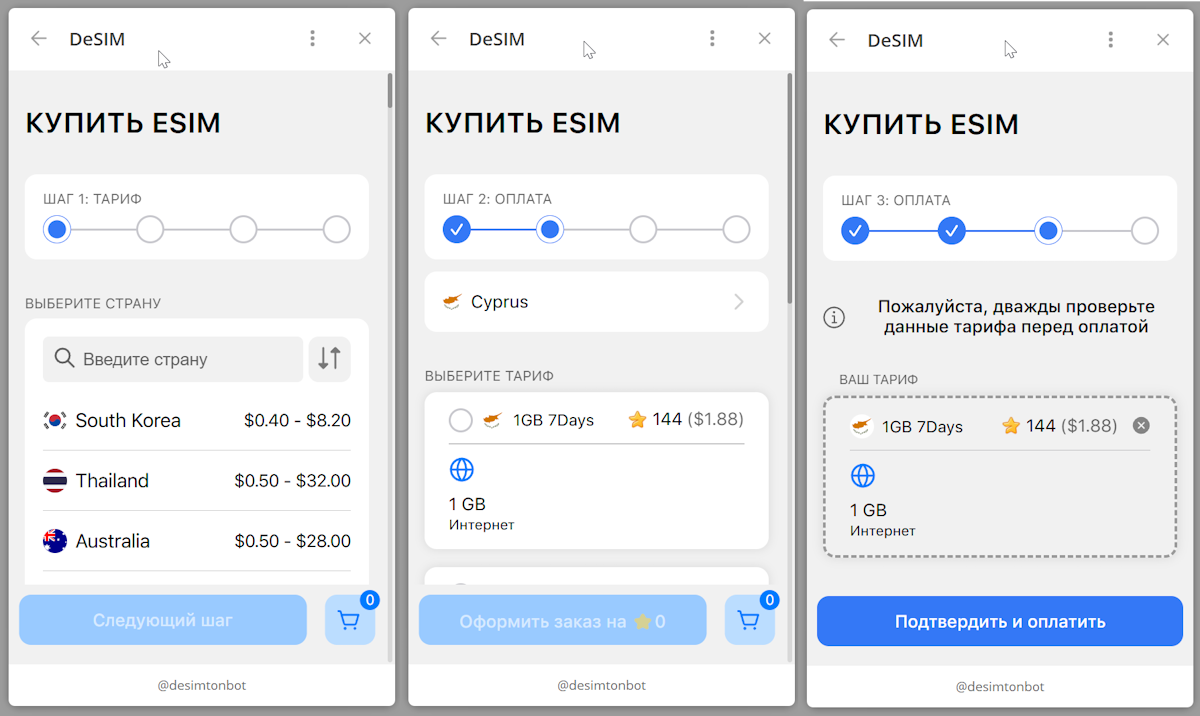
To activate your prepaid eSIM, begin by scanning the QR code from your purchase confirmation or manually entering the activation code in your device’s cellular settings menu. On an iPhone, navigate to Settings > Cellular > Add eSIM; on Android, go to Settings > Connections > SIM Manager. After scanning, label your new plan (e.g., “Travel Data”) to avoid confusion. Confirm the installation prompt, then wait 30–60 seconds for the profile to download. Once complete, enable the line and set it as your default for data. Some devices require a restart to finalize the network registration.
Summary: Scan QR code or enter code in settings, confirm installation, rename the profile, enable as default data line, and restart if needed.
Troubleshooting Common Issues with Setup and Connectivity
If your prepaid eSIM fails to activate, first confirm the device is unlocked and eSIM-compatible. A missing network usually stems from incorrect APN settings or manual profile installation errors; re-scan the QR code or re-enter the activation code exactly as provided. Connectivity drops often occur when dual SIMs conflict—temporarily disable the physical SIM to isolate the issue. Verify that «Data Roaming» is toggled on, as prepaid eSIMs frequently rely on roaming partners. If the profile appears but no service displays, remove and re-add the eSIM via your device’s cellular settings, then reboot. Persistent failures may require a fresh eSIM profile from the provider’s portal.

Smart Usage Tips for Maximizing Your Prepaid Mobile Data
To stretch your prepaid eSIM data, always activate a data-only plan and disable your primary physical SIM’s mobile data to avoid accidental roaming charges. In settings, set your APN correctly and toggle on «Low Data Mode» to stop background app refreshes. Use offline maps and download streaming content over Wi-Fi before switching to your eSIM.
The biggest trick is to manually restrict app background data for services like email and social media—this alone can save over 30% of your allowance.
Finally, monitor usage via your eSIM provider’s app daily, not just at month’s end, so you can adjust habits before running out.
Avoiding Overage Charges and Understanding Fair Usage Policies
To avoid unexpected costs with your prepaid eSIM, first, identify data thresholds set by your plan. Many providers enforce data throttling after a fixed cap, not hard cutoffs. Monitor your usage through the provider’s app to recognize when you approach that limit. Understanding Fair Usage Policies (FUP) is critical: these terms often slash speeds after you exceed a few GBs, even on «unlimited» plans. Pre-emptively purchasing a top-up before hitting the cap prevents both slowdowns and stretched charges. Always check the FUP for your specific eSIM, as policies vary by region.
Track your cap and read the Fair Use Policy; topping up early avoids throttling and overage fees.
Using Wi-Fi Hotspots and Data-Saving Features
Stretch your prepaid eSIM further by prioritizing Wi-Fi offload for heavy tasks like streaming or app updates. Activate your device’s data saver mode to restrict background app activity, and download offline maps or playlists while connected to a hotspot. Throttle video resolution to 480p to curb consumption, and set your phone to auto-disable mobile data when a trusted Wi-Fi network is reachable.
- Toggle data-saving mode to block non-essential background syncing
- Use hotel, café, or public library Wi-Fi for large downloads
- Enable low-data mode per app (e.g., social media, browsers)
- Pre-cache content (maps, podcasts) when connected to free hotspots
Security and Privacy Considerations When Using Digital SIMs
The backpacker bought a prepaid eSIM from a corner café’s Wi-Fi hotspot, unaware the QR code’s embedded links could reroute traffic through a malicious relay. Q: How can a prepaid eSIM compromise privacy? A: If the QR code is tampered, it can silently clone your digital profile. Even after the trip, the old eSIM profile lingered in the phone’s secure element; later, a phishing SMS—sent using that stale link—mimicked the carrier to steal banking codes. Real control means purging every digital copy manually before selling the device, and never scanning an eSIM QR over unencrypted public networks.
Protecting Your Personal Information During Remote Provisioning
Remote provisioning of a prepaid eSIM demands that you verify the provider’s official app or website before initiating any data exchange. Only download the eSIM profile from the official app store or a trusted provider link, as impostor pages are common. During setup, avoid screensharing or typing your ID information on public Wi-Fi. Always check that the connection is HTTPS and that you are granting minimal necessary permissions. Secure identity verification is your first defense; if asked for excessive personal data like your full home address, question the necessity. Q: What personal info is truly necessary for remote provisioning? A: Only what verifies your identity and location for service activation, typically your name, email, and sometimes a government ID; payment details are separate. Refuse any request for biometric data or passwords unrelated to the eSIM profile.
What Happens When Your Temporary Plan Expires
When your prepaid eSIM’s temporary plan expires, connectivity is immediately suspended, so you can no longer send SMS, make calls, or use mobile data over that profile. The Singapore eSIM eSIM remains installed on your device but enters a dormant state. To regain service, you must purchase a new plan from the same provider; many carriers allow this directly through their app or website. If you do not renew within a specified grace period—often 30 to 90 days—the provider may permanently delete the eSIM profile, requiring a full re-download. For security, deactivate abandoned eSIM profiles in your device settings to prevent remote reactivation.
- Step 1: Verify the expiry date in your eSIM’s management menu.
- Step 2: If needed, delete the expired profile to avoid confusion with active plans.
- Step 3: Retrieve required credentials from your account before profile deletion if you plan to reuse the provider.